The 1980s AI photo trend is everywhere for a reason: people do not just want “old filter.” They want to look like they stepped out of a dreamy vintage movie — soft glow, film grain, bigger hair, warmer colour, and that slightly imperfect analogue magic.
This guide gives you 10 best prompts written for that exact makeover. Copy, paste, upload your photo, and generate. You can run them in ChatGPT-style image tools or in Create with AI. For a broader India-focused setup (studio, family album, street), see our 1980s photo prompt ChatGPT guide. For writing better prompts in general, use best ChatGPT prompts.
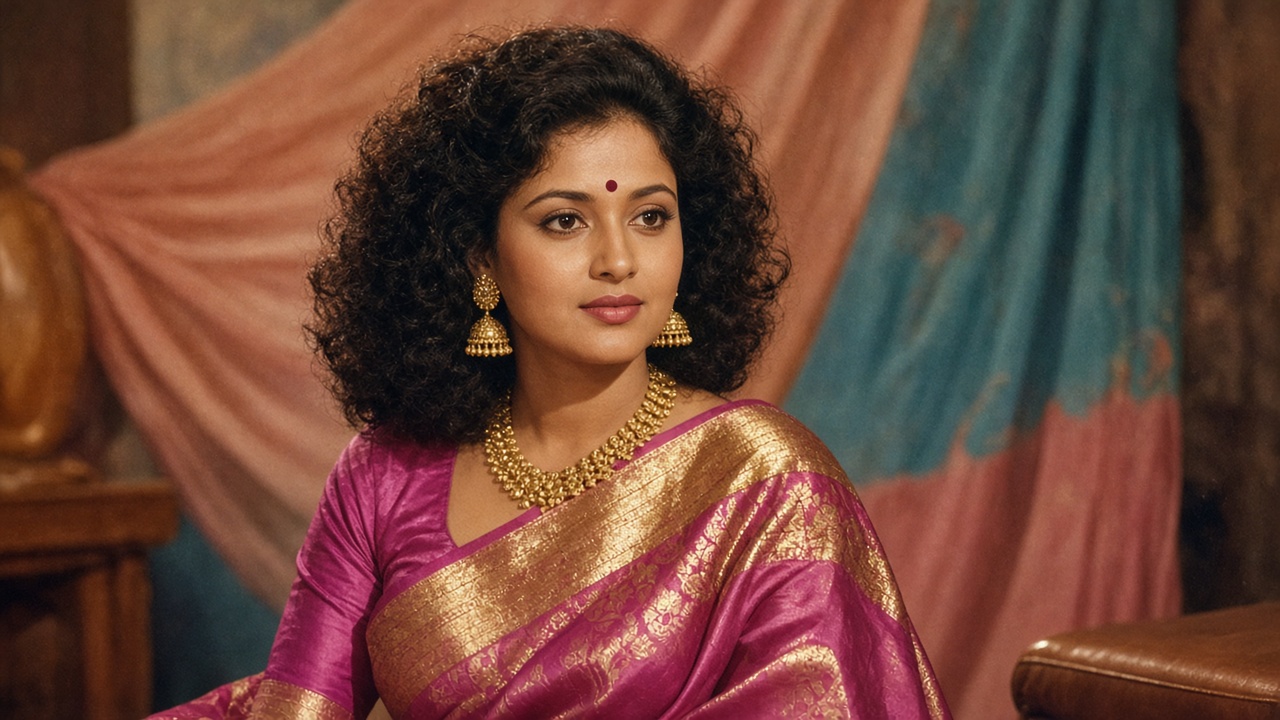
Quick Answer: How Do You Get a Dreamy Vintage Movie Makeover?
| Step | Do this |
|---|---|
| 1 | Upload one clear face photo |
| 2 | Pick one prompt from the list below |
| 3 | Keep identity locked: same face, age, and features |
| 4 | Ask for analogue film light, grain, and 1980s wardrobe |
| 5 | Ban “ageing filter,” plastic skin, and modern phone look |
TL;DR: A vintage movie makeover rebuilds clothes, light, and film texture — it does not slap sepia on a selfie. Generate in Create with AI when you want a simple creator workspace.
Table of Contents
- Quick Answer: How Do You Get a Dreamy Vintage Movie Makeover?
- What Makes a Photo Look Like a 1980s Movie Still?
- How to Use These Prompts
- 10 Best Prompts for a Dreamy Vintage Movie Makeover
- Prompt Formula You Can Reuse
- Common Mistakes
- Where to Generate the Look
- Captions That Match the Makeover
- Frequently Asked Questions
- Conclusion
What Makes a Photo Look Like a 1980s Movie Still?
A dreamy vintage movie look usually has five ingredients:
- Soft key light — warm lamps, window glow, or studio softboxes, not harsh phone flash alone
- Film colour — slightly lifted shadows, creamy highlights, gentle saturation
- Grain and softness — fine film grain, mild lens bloom, not heavy blur
- Period styling — hair, clothes, jewellery, and background that belong to the decade
- Cinematic framing — portrait or medium shot that feels like a paused VHS or cinema still
If your prompt only says “make it vintage,” the model often returns a filter. If you name light, wardrobe, and film stock, you get a makeover.
How to Use These Prompts
- Start from a clear selfie or portrait.
- Paste one full prompt.
- Add your own detail in brackets if needed (city, outfit colour, mood).
- Generate twice.
- Change one thing if the face drifts or the clothes feel modern.
These prompts work for Instagram Reels covers, profile refreshes, couple shots, and “Add Yours” trend posts.
10 Best Prompts for a Dreamy Vintage Movie Makeover
Copy any prompt below as written. Replace nothing except optional notes in [brackets].
1. Soft romance movie still
Transform this photo into a dreamy 1980s vintage romance-movie still.
Keep my exact facial features, age, and skin tone. Do not age me.
Restyle hair and clothes to late-1980s soft romantic fashion.
Use warm golden key light, gentle lens bloom, soft background bokeh,
fine analogue film grain, creamy highlights, and cinematic colour.
Frame as a medium close-up movie still. No modern phone look, no plastic skin,
no heavy Instagram filter, no text overlays.
2. Neon night city romance
Recreate this image as a dreamy 1980s night-time movie photograph.
Keep my face identity locked. Change outfit to 1980s night-out style.
Add subtle neon reflections, wet street glow, soft haze, and film grain.
Look like a paused frame from a late-80s city romance film.
Avoid cyberpunk, avoid futuristic neon overload, avoid ageing.
3. Classic studio publicity still
Turn this photo into a 1980s film-studio publicity portrait.
Keep my face unchanged. Style hair with period volume.
Use soft studio key light, gentle rim light, muted backdrop,
analogue colour negative look, fine grain, and elegant cinematic posing.
Make it feel printed for a movie magazine, not a phone selfie.
No modern wardrobe, no digital perfection.
4. Road-movie golden hour
Give this photo a dreamy 1980s road-movie makeover.
Keep my facial features identical. Restyle clothes for casual late-80s travel.
Golden-hour sunlight, dusty warm air, soft contrast, film grain,
cinematic widescreen feel cropped as a portrait still.
Background can suggest an old highway or parked classic car softly out of focus.
No modern logos, no phone UI, no ageing filter.
5. Rainy window melancholy
Transform this into a dreamy vintage 1980s movie scene by a rainy window.
Keep my face and age the same. Soft teal-and-amber mood, rain trails on glass,
gentle film bloom, low contrast, intimate close-up framing.
Look like an emotional scene from a late-80s drama.
No horror effects, no ageing, no modern cafe aesthetics.
6. Dance-floor afterglow
Recreate this photo as a dreamy 1980s dance-floor movie still.
Keep identity locked. Period hairstyle and outfit.
Soft coloured gels, gentle haze, subtle motion in background lights,
analogue grain, warm skin tones, cinematic glow.
Make it romantic and stylish, not club-flash harsh.
No LED wall look, no modern sneakers focus, no text.
7. Beach sunset film ending
Give this image a dreamy 1980s beach-movie ending look.
Keep my face exact. Restyle hair and clothes for late-80s summer.
Golden sunset backlight, soft wind, gentle lens flare, film grain,
warm faded colour like an old cinema print.
Peaceful, cinematic, not oversaturated.
No modern swimwear logos, no phone selfie angle, no ageing.
8. Black-and-white art-house 80s
Transform this photo into a dreamy late-1980s black-and-white art-house still.
Keep facial features identical. Soft contrast, delicate grain,
quiet cinematic composition, period clothing hints.
Elegant and emotional, not harsh noir.
No scratches overload, no ageing, no modern streetwear.
9. Family-album movie memory
Recreate this as if it were a cherished still from a 1980s home movie transferred to film.
Keep my face the same. Soft flash-meets-tungsten colour, slight vignette,
imperfect but beautiful analogue texture, warm nostalgia.
Clothes and hair should match the decade.
Dreamy and personal, not polished fashion.
No plastic skin, no modern interior gadgets in focus.
10. Hero poster close-up
Turn this photo into a dreamy 1980s movie-poster close-up.
Keep my exact face and age. Dramatic but soft key light,
subtle backlight halo, rich but faded film colour, fine grain,
confident cinematic expression, period styling.
Make it feel like a theatrical poster crop, not a selfie.
No modern typography, no logos, no ageing, no oversharpening.
Prompt Formula You Can Reuse
When you want your own variation, use this skeleton:
Transform this photo into a dreamy 1980s [movie type] still.
Keep my exact facial features, age, and skin tone. Do not age me.
Restyle hair and clothes to [1980s look].
Lighting: [soft / golden / neon-soft / studio].
Texture: analogue film grain, gentle bloom, cinematic colour.
Frame: [close-up / medium shot].
Avoid: modern phone look, plastic skin, heavy filters, text, ageing.
That formula is the difference between a filter and a makeover. More identity-lock tips live in the 1980s photo prompt ChatGPT guide.
Common Mistakes
- Asking only for “vintage” or “retro” with no lighting or wardrobe details
- Mixing five movie genres in one prompt
- Forgetting to say keep my face / do not age me
- Accepting plastic, over-smoothed skin
- Using a dark, blurry, or heavily filtered source photo
- Regenerating ten times without changing the weak line
Fix one variable at a time: light, then clothes, then background.
Where to Generate the Look
| Tool | Best for |
|---|---|
| ChatGPT image chat | Fast experiments if you already use ChatGPT |
| Create with AI | KnowAnt’s creator workspace for image makeovers |
| KnowAnt Image Studio | Direct image generation from a prompt |
If you also need caption ideas after the makeover, draft them with Write with AI or browse Instagram captions for boys and how to write an Instagram bio.
Captions That Match the Makeover
Keep captions short and on-theme:
- “Caught between the credits and the rewind.”
- “If this were a VHS still, I’d keep the grain.”
- “1980s lighting. Same me.”
- “Dreamy movie ending energy.”
Avoid overexplaining the AI process in the first line. Let the image do the work; put the prompt tip in a comment if people ask.
Frequently Asked Questions
What is the 1980s AI photo trend?
It is a social trend where people use AI image tools to restyle a modern photo into a late-1980s look — often with film grain, period fashion, and cinematic lighting — instead of using a simple vintage filter.
How do I give my images a dreamy vintage movie makeover?
Upload a clear photo, paste one of the prompts above, lock your facial identity, and ask for soft film light plus 1980s styling. Generate in ChatGPT or Create with AI.
Why does my AI photo look fake?
Usually the prompt is too vague, the source photo is poor, or identity/wardrobe instructions conflict. Name light, film grain, and clothes clearly, and ban plastic skin and ageing.
Can I use these prompts for couple or group photos?
Yes, but say how many people appear and keep each face identity locked. Start with simpler two-person framing before big groups.
Are these prompts only for ChatGPT?
No. They work in most text-to-image or photo-restyle tools that accept detailed prompts, including KnowAnt Create with AI.
Is a vintage filter the same as a movie makeover?
No. A filter changes colour. A makeover changes wardrobe, hair, lighting, and film texture while keeping your face.
Conclusion
The 1980s AI photo trend rewards specific prompts. Soft light, film grain, decade styling, and a locked identity turn a normal selfie into a dreamy vintage movie still.
Pick one of the 10 best prompts above, generate twice, and tweak one line if needed. Start in Create with AI, then deepen the India/studio variations with our 1980s photo prompt ChatGPT guide when you want more looks beyond the movie-makeover set.