“This AI Translator helps me understand academic materials in multiple languages while keeping the meaning accurate. It's much better than traditional translators.”

Annika Palmari
International Student
Fix grammar, spelling, punctuation, and awkward phrasing in seconds with Knowant’s free AI Grammar Checker. Paste an essay draft, a client email, or a business report and get clear suggestions you can accept or edit — no sign-up required to try it. When you need deeper rewrites or a full draft workspace, continue in Knowant Writer at https://www.knowant.com/product/write-with-ai.
No corrected text yet
Record conversations, generate summaries and action items, then send follow-ups without rewriting the meeting.
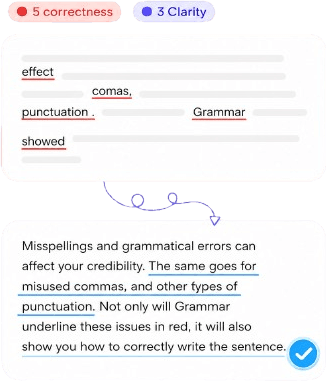
The AI flags subject-verb agreement, wrong tense shifts, dangling modifiers, article use, and preposition slips that autocorrect often ignores. Each suggestion targets the sentence you wrote, not a generic rule list, so academic paragraphs and technical memos both get sensible fixes.
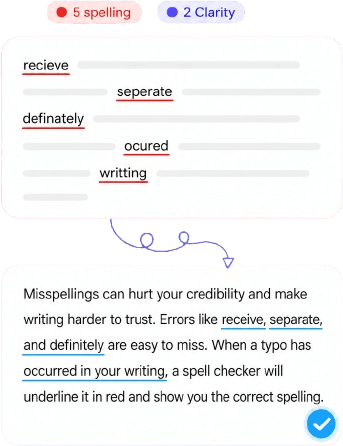
Catch homophones (their/there), inconsistent capitalization in headings, missing Oxford commas where style matters, and stray apostrophes before you attach a file or hit send. Helpful when you are finishing a resume, a newsletter, or a contract summary under time pressure.
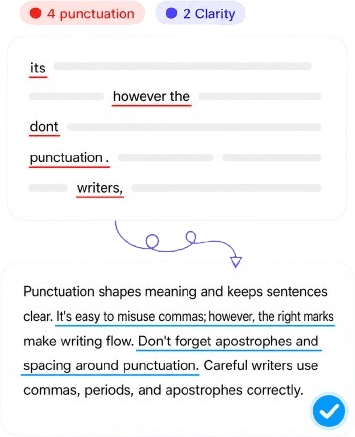
Long sentences and repeated words make even correct grammar hard to read. The checker suggests tighter phrasing and smoother flow while keeping your meaning — ideal for blog intros, executive summaries, and cover letters where the first impression is the wording.
Students hit word limits without losing clarity; professionals send emails that sound confident, not rushed; teams keep proposals consistent. You get fast corrections here for free, and a natural path to paraphrasing, summarizing, and long-form drafting inside Knowant Writer when the project grows.
See issues highlighted in context so you fix the right word, not just the red underline from yesterday’s draft.
Get alternatives for stiff or informal lines — useful when an email to a client should sound warmer, or an essay argument needs a clearer thesis sentence.
Suggestions aim for readable English, not robotic perfection — you stay in control of voice and terminology.
Essays and lab reports, onboarding docs, sales emails, LinkedIn posts, and meeting notes — one checker before you export or paste into your main app.
From pasted text to cleaner copy in three steps — paste, review AI suggestions, then copy or open Writer for the next pass.
Copy from Google Docs, Word, Gmail, or your LMS into the grammar checker. Short emails and full essay sections both work; paste only what you want reviewed.
The AI reviews spelling, punctuation, grammar, and readability in seconds. Scan suggestions top to bottom or jump to the sentences that matter most for your grade or stakeholder.
Accept changes that fit your style, skip the rest, and copy the updated text back to your document. For larger edits — restructure, shorten, or expand — open Knowant Writer at https://www.knowant.com/product/write-with-ai and keep working in one place.
Students, freelancers, and teams use Knowant to catch mistakes before submit or send — and to keep improving their drafts over time.
“This AI Translator helps me understand academic materials in multiple languages while keeping the meaning accurate. It's much better than traditional translators.”
Annika Palmari
“I use it to generate eye-catching YouTube thumbnails and social media graphics. The image quality is fantastic and saves me a lot of time.”

Ryan Hoffman
“Converting invoices and purchase reports into Excel has become effortless. The table recognition is incredibly accurate.”

Austin Distel
“I use it to generate social media posts and ads. The content is always engaging and relevant to my audience.”

Brooke cagle
Answers about free use, essays, emails, business writing, accuracy, and how this tool fits with Knowant Writer.
An AI grammar checker analyzes your writing for grammar, spelling, punctuation, and often clarity problems, then suggests corrections. Knowant’s version runs online so you can check a paragraph or a multi-page draft without installing software. It is a editing aid: you review each change before using the text in school, work, or publication.
Yes. You can run grammar and spelling checks on this page without paying to start. Free access is meant for everyday proofreading — essays due tonight, emails before a meeting, a quick pass on a report. If you need ongoing projects, saved drafts, and more Writer tools, you can sign up and explore Knowant Writer separately.
Many students use it for essays, research summaries, and discussion posts to catch errors before submission. Follow your institution’s rules on AI assistance: some courses allow grammar help but not generative rewriting. Use suggestions to improve your own sentences, and always cite sources you quote — the checker does not replace academic integrity policies.
Yes. It helps with client emails, project updates, HR policies, proposals, and slide deck copy where typos undermine credibility. Business writing often needs a consistent tone; accept suggestions that match your brand voice and leave informal fixes for internal chat only.
Good suggestions preserve intent while fixing errors or tightening wording. You choose what to apply, so legal disclaimers, product names, and deliberate casual tone stay intact. If a rewrite feels off, reject it or rephrase manually — or use Knowant Writer for controlled tone and length changes.
Built-in checkers excel at obvious typos. AI grammar tools also weigh sentence structure, agreement, punctuation patterns, and sometimes readability across longer passages. Use both: your editor’s spell check for quick typing, and Knowant when the draft is important or dense.
This page is optimized for a fast, free grammar pass. Knowant Writer (https://www.knowant.com/product/write-with-ai) is the fuller workspace for drafting, paraphrasing, summarizing, and refining longer content. Many users check grammar here, then move the polished text into Writer when they need to develop ideas or collaborate on a document.
Treat sensitive data (passwords, personal IDs, unreleased financials) like any cloud tool: avoid pasting secrets. For routine essays and business copy, paste what you would normally send to an editor. Check Knowant’s privacy policy for how data is handled, and use your organization’s guidelines for confidential material.
 Knowant
Paste your text and get instant feedback on grammar, spelling, punctuation, and sentence clarity. Use it for school assignments, job applications, customer replies, SOPs, and internal reports — free to try in the browser. Need a dedicated writing workspace with rewrite and research tools? Continue in Knowant Writer when you are ready.